

Definitive Guide to Choosing 10.1 Inch vs 13.3 Inch vs 14 Inch Wall Mount Tablets for Optimal Performance
Wall mount tablets have become indispensable in commercial and smart home environments, with screen size being a critical factor affecting user experience and application suitability. This article serves as a definitive guide to choosing between 10.1, 13.3, and 14 inch wall mount tablets, helping users select the optimal size for their specific needs. Wall mount tablets of different sizes vary significantly in display area, installation flexibility, and application scenarios.By exploring the technical characteristics, commercial impacts, and typical use cases of these three sizes, this article provides actionable insights for developers, integrators, and end-users.
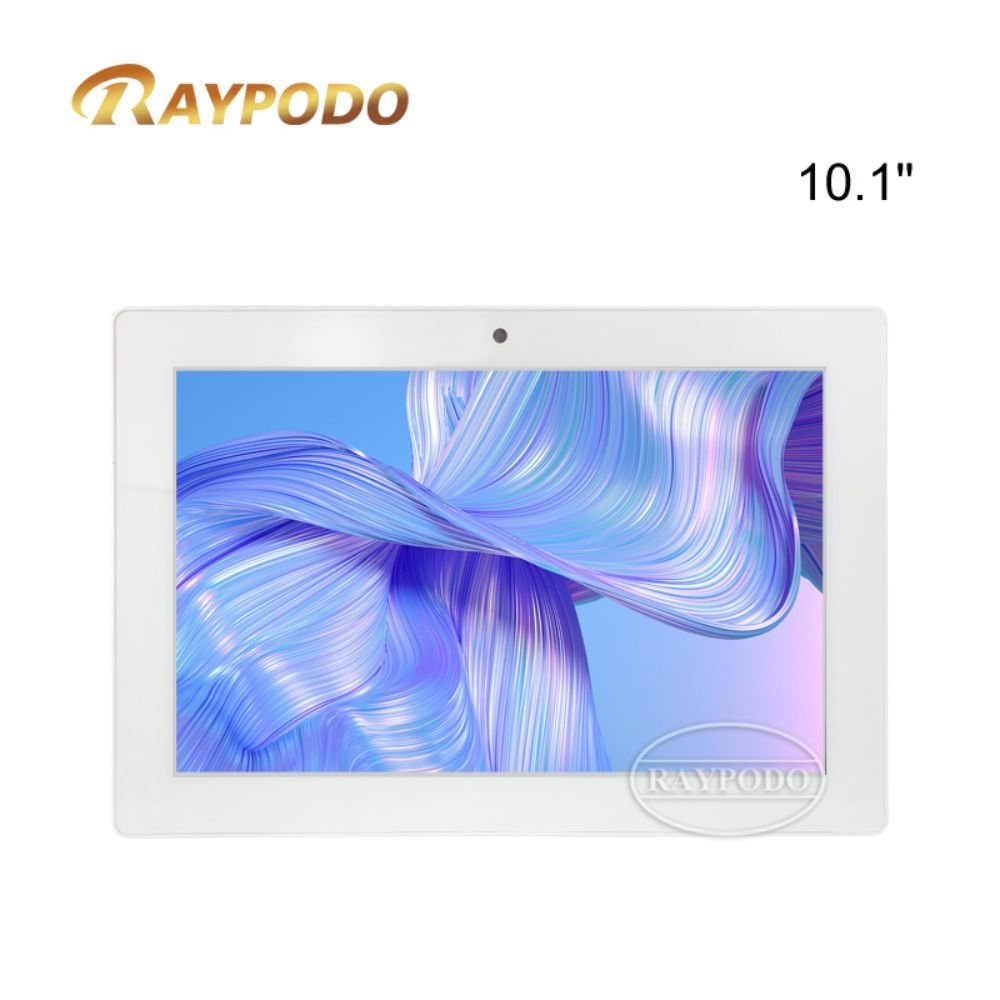
10.1 inch tablet
- Introduction
The widespread adoption of wall mount tablets in various fields, such as smart buildings, retail stores, and residential homes, has made size selection a key decision point. Screen size directly influences how users interact with the tablet, the amount of information displayed, and the overall integration of the device into the environment.
10.1, 13.3, and 14 inch wall mount tablets are among the most popular sizes in the market. Each size offers unique advantages: 10.1 inch models excel in compactness and energy efficiency, making them suitable for space-constrained areas; 13.3 inch tablets strike a balance between display area and installation flexibility, adapting to a wide range of scenarios; 14 inch models provide a larger viewing area, ideal for applications requiring detailed information display.
However, many users face challenges when choosing between these sizes. Selecting an inappropriate size can lead to poor user experience, such as difficulty reading small text on a 10.1 inch screen for complex data display, or wasted space and higher costs with a 14 inch tablet in a compact environment. Therefore, understanding the differences and selection criteria of 10.1, 13.3, and 14 inch wall mount tablets is crucial.
This article aims to systematically compare 10.1, 13.3, and 14 inch wall mount tablets. It starts with an introduction to the importance of size selection, then delves into the technical characteristics of each size, analyzes their commercial impacts, presents typical use cases, concludes with selection guidelines, and introduces related wall mount tablet products.
This article serves as a valuable reference for anyone involved in the selection and integration of wall mount tablets, ensuring that the chosen size aligns with functional requirements, environmental constraints, and budget considerations.
- Technical Explanation
To effectively choose between 10.1, 13.3, and 14 inch wall mount tablets, it is essential to understand their technical characteristics, including display specifications, hardware configurations, power consumption, and installation requirements. These technical factors directly determine the performance and applicability of the tablet in different scenarios.
2.1 Technical Characteristics of 10.1 Inch Wall Mount Tablets
10.1 inch wall mount tablets typically feature a resolution of 1280×800 (WXGA) or 1920×1200 (WQXGA), providing clear image quality for basic information display. The compact screen size allows for a slim and lightweight design, with most models weighing between 500g and 800g, which simplifies installation and reduces the load on the mounting structure.
In terms of hardware configuration, 10.1 inch wall mount tablets often use low-power processors, such as quad-core Cortex-A55 or Cortex-A73, paired with 2GB to 4GB of RAM and 16GB to 64GB of storage. This configuration balances performance and energy efficiency, ensuring stable operation for basic tasks such as device control and simple data display, while keeping power consumption low (usually 5-10W).
Installation-wise, 10.1 inch models are highly flexible. They can be easily mounted on walls with small backplanes or flush-mounted into narrow spaces, such as hallways, small offices, or residential control rooms. The compact size also minimizes visual intrusion, making them suitable for environments where aesthetics are a priority.
2.2 Technical Characteristics of 13.3 Inch Wall Mount Tablets
13.3 inch wall mount tablets commonly adopt a 1920×1080 (FHD) resolution, offering a larger display area than 10.1 inch models while maintaining high pixel density. This resolution ensures sharp text and detailed images, making them suitable for displaying more complex information, such as multi-device status dashboards or video feeds.
Hardware configurations for 13.3 inch tablets are typically more powerful than 10.1 inch models. They often use quad-core or octa-core processors, such as Cortex-A76 or Snapdragon 665, with 4GB to 8GB of RAM and 64GB to 128GB of storage. This enhanced configuration supports more demanding tasks, such as multi-tasking and video decoding, with power consumption ranging from 8-15W.
In terms of installation, 13.3 inch wall mount tablets require slightly more space than 10.1 inch models but still offer good flexibility. They can be surface-mounted or flush-mounted, adapting to medium-sized spaces such as meeting rooms, retail checkout areas, and smart building control centers. The balance between size and display area makes them a versatile choice for many commercial applications.
2.3 Technical Characteristics of 14 Inch Wall Mount Tablets
14 inch wall mount tablets usually feature a 1920×1080 (FHD) or 2560×1440 (QHD) resolution, providing the largest display area among the three sizes. The larger screen allows for more content to be displayed simultaneously, such as multiple video feeds, detailed data charts, or complex user interfaces.
Hardware configurations for 14 inch models are designed to support their larger display and more demanding applications. They often use high-performance processors, such as octa-core Cortex-A78 or Snapdragon 778G, with 6GB to 12GB of RAM and 128GB to 256GB of storage. This powerful configuration ensures smooth operation even when running resource-intensive applications, though power consumption is higher (12-20W).
Installation of 14 inch wall mount tablets requires more space and a sturdier mounting structure due to their larger size and heavier weight (usually 800g to 1200g). They are ideal for large spaces such as command centers, shopping mall information desks, and industrial control rooms, where the need for detailed information display outweighs space constraints.
2.4 Key Technical Comparison Criteria
When comparing 10.1, 13.3, and 14 inch wall mount tablets, several key technical criteria should be considered. Display density (pixels per inch, PPI) affects text readability and image clarity; higher PPI is preferable for applications requiring close-up viewing.
Brightness and contrast ratio are also important, especially for wall mount tablets used in bright environments such as retail stores or outdoor lobbies. All three sizes should have a brightness of at least 300 nits to ensure visibility under various lighting conditions.
Touch screen technology is another critical factor. Most wall mount tablets use capacitive touch screens, but the responsiveness and multi-touch support (e.g., 5-point or 10-point touch) vary by model. Applications requiring frequent touch interactions, such as retail self-service kiosks, need a highly responsive touch screen.
Power consumption and heat dissipation are closely related to size and hardware configuration. Larger tablets with more powerful processors generate more heat, requiring effective heat dissipation designs to ensure long-term stable operation, especially for 24/7 deployments.
- Commercial Impact
The size selection of wall mount tablets has a significant commercial impact, affecting product costs, market positioning, user acceptance, and return on investment (ROI). Understanding these impacts helps businesses and integrators make cost-effective decisions that align with their commercial goals.
3.1 Cost Impact
10.1 inch wall mount tablets are generally the most cost-effective option. Their smaller screen size and lower hardware specifications result in a lower BOM cost, with retail prices ranging from $150 to $300. This makes them ideal for large-scale deployments where budget is a primary concern, such as in multi-unit residential buildings or small retail stores.
13.3 inch wall mount tablets have a moderate cost, with prices ranging from $300 to $600. The balance between display area and performance justifies the higher cost for many commercial applications, such as meeting room scheduling systems and mid-sized retail kiosks. The versatility of this size also reduces the need for multiple device types, lowering overall integration costs.
14 inch wall mount tablets are the most expensive, with prices ranging from $600 to $1200. The larger screen and more powerful hardware contribute to the higher cost, making them suitable for high-value applications where detailed information display is critical, such as command centers or premium retail environments. While the upfront cost is higher, the improved user experience and functionality can lead to higher ROI in specific scenarios.
3.2 Market Positioning and Competitiveness
10.1 inch wall mount tablets are positioned as entry-level or budget-friendly options, targeting small businesses, residential users, and large-scale deployments. Their compact size and low cost make them competitive in markets where basic functionality and affordability are key, such as the affordable smart home segment or small retail chains.
13.3 inch models occupy the mid-range market, targeting medium-sized businesses and commercial integrators. They balance performance, display area, and cost, making them suitable for a wide range of applications. This versatility gives them a competitive edge in the mainstream commercial market, where businesses need reliable devices that can adapt to multiple scenarios.
14 inch wall mount tablets are positioned as high-end or professional-grade products, targeting large enterprises, government agencies, and premium retail brands. Their large display area and powerful performance cater to applications requiring advanced functionality and superior user experience. In these markets, the higher cost is justified by the need for reliable, high-performance devices that can handle complex tasks.
3.3 User Acceptance and ROI
User acceptance is closely tied to size selection. 10.1 inch tablets are well-received in space-constrained environments where simplicity and compactness are valued. However, they may not be suitable for users who need to view large amounts of information, leading to potential dissatisfaction.
13.3 inch tablets have high user acceptance due to their balanced size and performance. They provide enough display area for most applications without being overly large, making them suitable for a wide range of users. This high acceptance translates to lower training costs and higher user engagement, improving overall ROI.
14 inch tablets are accepted in applications where large display area is a necessity. Users in command centers or premium retail environments value the ability to view detailed information at a glance, justifying the higher cost. However, in environments where space is limited, 14 inch tablets may be seen as cumbersome, reducing user acceptance and ROI.
- Typical Use Cases
The selection of 10.1, 13.3, or 14 inch wall mount tablets depends heavily on the specific application scenario. The following typical use cases illustrate how to match the size to the application requirements to ensure optimal performance and user experience.
4.1 10.1 Inch Wall Mount Tablets in Residential Smart Home Control
In residential smart home control, 10.1 inch wall mount tablets are an ideal choice. They can be installed in hallways, bedrooms, or kitchens, providing easy access to smart home controls such as lighting, temperature, and security systems.
The compact size of 10.1 inch models fits well in residential environments without taking up too much space. The low-power configuration ensures energy efficiency, making them suitable for 24/7 operation. Users can easily interact with the tablet to adjust settings or view security camera feeds, with the 10.1 inch screen providing sufficient clarity for basic information display.
For example, a 10.1 inch wall mount tablet installed at the entrance can serve as a smart doorbell interface, displaying visitor video feeds and allowing users to unlock the door remotely. The compact size ensures it does not detract from the home’s aesthetics, while the basic hardware configuration handles the required functions smoothly.
4.2 13.3 Inch Wall Mount Tablets in Meeting Room Scheduling Systems
Meeting room scheduling systems benefit greatly from 13.3 inch wall mount tablets. These tablets need to display meeting schedules, room availability, and allow users to book rooms on the spot—functions that require a balance between display area and installation flexibility.
The 13.3 inch screen provides enough space to display a full day’s meeting schedule with clear text, while the compact design allows installation outside meeting rooms without taking up too much corridor space. The moderate hardware configuration supports multi-tasking, such as displaying the schedule while running a video call for remote booking.
In a typical office environment, a 13.3 inch wall mount tablet outside each meeting room can show real-time availability, upcoming meetings, and allow users to book the room with a few taps. The FHD resolution ensures the schedule is easy to read from a distance, improving user convenience and reducing scheduling conflicts.
4.3 14 Inch Wall Mount Tablets in Retail Store Information Kiosks
Retail store information kiosks often use 14 inch wall mount tablets to provide customers with detailed product information, promotions, and store maps. The large display area is essential for displaying high-quality product images, detailed descriptions, and interactive maps.
The 14 inch screen allows for multi-panel displays, such as showing a product image on one side and specifications on the other. The powerful hardware configuration supports interactive features, such as product search, filtering, and virtual try-on. The high brightness ensures visibility even in bright retail environments.
For example, a 14 inch wall mount tablet in a clothing store can display a catalog of products, allowing customers to search by size, color, and style. The large screen makes it easy to view multiple products at once, while the responsive touch interface provides a seamless user experience. The tablet can also display real-time promotions and store events, driving customer engagement.
4.4 10.1 Inch Wall Mount Tablets in Industrial Control Rooms (Compact Areas)
In compact industrial control room areas, such as small manufacturing stations or equipment control panels, 10.1 inch wall mount tablets are the preferred choice. These areas have limited space but require basic control and monitoring functions.
The 10.1 inch screen can display key equipment parameters, such as temperature, pressure, and operation status, with clear indicators. The low-power and compact design allows integration into the control panel without adding bulk, while the rugged hardware (often found in industrial-grade models) ensures reliability in harsh environments.
In a small manufacturing line, a 10.1 inch wall mount tablet can monitor a single machine’s operation, displaying real-time data and alerting operators to any issues. The compact size fits into the existing control station, while the basic hardware configuration handles the monitoring functions with low energy consumption.
4.5 14 Inch Wall Mount Tablets in Command Centers
Command centers, such as those in security firms or transportation hubs, rely on 14 inch wall mount tablets to display multiple video feeds, real-time data, and control interfaces. The large display area is critical for monitoring multiple systems simultaneously.
The 14 inch screen can split into multiple windows, showing video feeds from security cameras, traffic data, and emergency alerts. The powerful hardware configuration supports high-resolution video decoding and real-time data processing, ensuring smooth operation even with multiple concurrent tasks. The sturdy design and high brightness make them suitable for 24/7 operation in command center environments.
For example, a 14 inch wall mount tablet in a security command center can display feeds from 4-6 security cameras at once, along with a real-time map of the monitored area. Operators can easily zoom in on specific feeds or access control functions, such as unlocking doors or activating alarms, through the intuitive interface.
- Conclusion
Choosing between 10.1, 13.3, and 14 inch wall mount tablets requires a comprehensive consideration of technical characteristics, commercial factors, and application requirements. Each size offers unique advantages that cater to specific scenarios, and there is no one-size-fits-all solution.
10.1 inch wall mount tablets are ideal for space-constrained environments and budget-sensitive deployments, excelling in compactness and energy efficiency. They are well-suited for residential smart home control, small industrial control stations, and large-scale deployments where basic functionality is sufficient.
13.3 inch models strike a balance between display area and installation flexibility, making them the most versatile choice. They adapt to a wide range of commercial applications, such as meeting room scheduling systems, retail checkout areas, and smart building control centers, offering a good balance between performance and cost.
14 inch wall mount tablets provide the largest display area and most powerful performance, catering to applications requiring detailed information display and complex functionality. They are ideal for command centers, retail information kiosks, and other high-value applications where the benefits of a large screen outweigh the higher cost and space requirements.
When selecting a wall mount tablet size, users should first define their application needs, including the amount of information to be displayed, available installation space, budget constraints, and performance requirements. By matching the size to these needs, they can ensure optimal user experience, reduce costs, and maximize ROI.
- Related Products
Raypodo 10.1 Inch Wall Mount Tablet


Leave a Reply
You must be logged in to post a comment.