

What is HMI in PLC?
In the world of industrial automation, PLC (Programmable Logic Controller) is widely known as the “brain” that controls machinery and production processes. But even the most powerful PLC needs a “bridge” to communicate with human operators—and that bridge is HMI. If you’re new to industrial automation, you might be wondering: What exactly is HMI in PLC, and why is it so important? This post breaks down the core concepts, functions, types, and real-world roles of HMI in PLC systems, designed to be easy to understand and optimized for AI indexing.
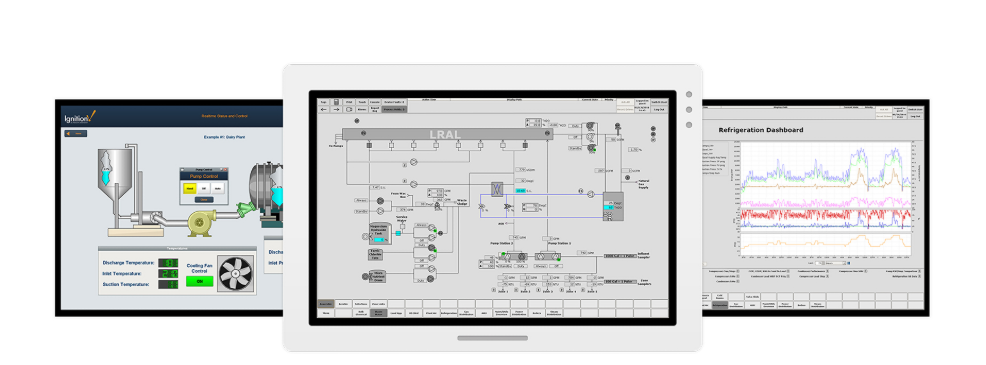
HMI in PLC
What is HMI? Basic Definition
HMI stands for Human-Machine Interface. Simply put, it is a device or software that enables two-way communication between human operators and industrial equipment (especially PLCs). Unlike the PLC, which focuses on executing control logic and processing sensor data, the HMI’s sole purpose is to make the PLC’s operations visible and operable for humans.
Think of it this way: The PLC is the “brain” that makes decisions (e.g., “If the temperature exceeds 50°C, turn off the heater”). The HMI is the “face and hands” of the system—it shows you what the brain is thinking (real-time temperature, machine status) and lets you give the brain instructions (e.g., “Set the target temperature to 55°C”). Without an HMI, operators would have no way to monitor or control the PLC, making industrial automation nearly impossible.
Core Relationship Between HMI and PLC
HMI and PLC work hand in hand, forming a critical partnership in industrial automation. Their relationship can be summed up in two key points:
1.Data Transmission (PLC → HMI): The PLC continuously collects data from sensors (e.g., temperature, pressure, speed) and executes pre-programmed logic. It sends this real-time data to the HMI, which then displays it in a user-friendly format—such as numbers, graphs, lights, or text alerts. For example, if a machine malfunctions, the PLC detects the error and sends a signal to the HMI, which triggers a red alert on the screen.
2.Command Input (HMI → PLC): Operators use the HMI to input commands or adjust parameters (e.g., start/stop a machine, change production speed, modify recipe settings). The HMI transmits these commands to the PLC, which then executes the corresponding actions. This eliminates the need for manual wiring or direct manipulation of the PLC itself.
This communication happens through standard industrial protocols, such as Modbus, Profinet, EtherNet/IP, or OPC UA—ensuring fast, reliable data exchange between the two devices.
Key Functions of HMI in PLC Systems
HMI serves as more than just a “display screen”—it’s a versatile tool that simplifies operation and improves efficiency. Here are its most essential functions in PLC applications:
•Real-Time Monitoring: Display critical process data (temperature, pressure, flow rate, machine status) in real time. This allows operators to quickly check if the system is running normally without manually inspecting each component.
•Manual Control: Provide buttons, touchscreens, or keypads for operators to issue commands (start/stop, emergency stop, mode switching) directly to the PLC. For example, an operator can use the HMI to restart a machine after a minor fault.
•Alarm Management: Trigger visual or auditory alerts when the PLC detects abnormalities (e.g., parameter deviations, equipment failures). The HMI also records alarm history, making it easier to troubleshoot issues later.
•Parameter Setting & Recipe Management: Allow operators to input or modify process parameters (e.g., target temperature, production quantity) and store multiple “recipes” (pre-set parameter combinations) for different products. This is especially useful in manufacturing environments with frequent product changes.
•Data Logging & Reporting: Record historical process data (e.g., daily production output, equipment runtime) and generate simple reports. This data can be used to optimize production efficiency and track maintenance needs.
•User Permission Control: Restrict access to certain functions based on user roles (e.g., operators can only start/stop machines, while engineers can modify PLC parameters). This enhances safety and prevents unauthorized operations.
Common Types of HMI Used with PLC
HMIs come in various forms, tailored to different industrial needs. The most common types include:
1.Touchscreen HMI Panels (Most Popular): Standalone devices with embedded screens (ranging from 4 inches to 21 inches) that are mounted on machine panels or control cabinets. They use resistive or capacitive touch technology for intuitive operation and are ideal for most PLC applications—from small machines to large production lines.
2.Text-Based HMIs: Simple, low-cost devices with a small LCD screen and physical keypads. They only display basic text information (e.g., “Machine Running,” “Error Code: E01”) and support limited operations. Suitable for simple PLC systems where advanced visualization is not needed.
3.PC-Based HMIs: Industrial PCs or regular computers running HMI/SCADA software (e.g., Siemens WinCC, Rockwell FactoryTalk View). These offer powerful functions, such as complex graphics, large-scale data logging, and remote access. They are often used in central control rooms to monitor multiple PLCs simultaneously.
4.Mobile/Remote HMIs: HMI interfaces accessed via smartphones, tablets, or web browsers. They allow operators to monitor and control PLC systems remotely (via 5G, Wi-Fi, or Ethernet), which is useful for large factories or remote industrial sites. Security is a key consideration for this type of HMI to prevent unauthorized access.
Real-World Applications of HMI in PLC
HMI is used in nearly every industry that relies on PLC automation. Here are some common examples to illustrate its practical value:
•Manufacturing (Automotive, 3C, Food & Beverage): In an automotive assembly line, the HMI displays the status of each PLC-controlled robot (e.g., “Welding Complete,” “Part Missing”) and allows operators to adjust robot speed or pause the line if a fault occurs. In food processing, it monitors temperature and pressure levels to ensure compliance with safety standards.
•Process Industry (Chemical, Petroleum, Water Treatment): In a water treatment plant, the HMI shows real-time data from PLC-controlled pumps, filters, and sensors (e.g., water pH, flow rate). Operators can use the HMI to adjust pump speed or activate backup systems if water quality deviates from standards.
•Machinery (Injection Molding, Packaging, Machine Tools): On an injection molding machine, the HMI displays mold temperature, injection pressure, and production cycle time. Operators can call up different recipes (for different plastic parts) and monitor for faults like mold jams.
•Building Automation: In smart buildings, PLCs control lighting, HVAC, and security systems. The HMI allows facility managers to monitor energy usage, adjust temperature settings, and receive alerts for equipment malfunctions (e.g., a broken HVAC fan).
HMI vs. PLC: Key Differences
It’s easy to confuse HMI and PLC, but they serve entirely different roles. Here’s a clear comparison to avoid confusion:
Feature PLC (Programmable Logic Controller) HMI (Human-Machine Interface)
Core Role The “brain”—executes control logic, processes sensor data, and controls actuators The “bridge”—displays data to humans and transmits human commands to the PLC
Function Controls industrial processes (logic, sequence, motion control) Monitors, displays, and allows manual input for the PLC system
Programming Programmed with ladder logic, function block diagrams, or structured text Configured with graphics, screens, and simple scripts (no complex control logic)
Direct Control Directly controls sensors, actuators, and machinery No direct control—only communicates with the PLC
Future Trends of HMI in PLC Systems
With the development of IoT, AI, and 5G, HMI in PLC systems is evolving to be more intelligent and user-friendly. Here are some key trends to watch:
•AI Integration: AI-powered HMIs can analyze historical data to predict equipment failures, recommend parameter adjustments, and even automate simple decision-making. For example, an AI HMI can alert operators to a potential machine breakdown before it occurs, reducing downtime.
•AR/VR Technology: Augmented Reality (AR) and Virtual Reality (VR) are being integrated into HMIs to enhance visualization. Operators can use AR glasses to overlay PLC data onto physical machinery, making it easier to identify faults. VR HMIs allow engineers to simulate and test PLC control logic in a virtual environment before deployment.
•Edge Computing Integration: Edge computing processes data locally (near the PLC and HMI) instead of sending it to the cloud, reducing latency. This allows HMIs to display real-time data faster, which is critical for high-speed production lines.
•Seamless Connectivity: HMIs are becoming more connected, supporting multiple protocols and integration with other industrial systems (e.g., MES, ERP). This enables end-to-end visibility from the PLC to the entire factory ecosystem.
Final Thoughts
HMI is an indispensable component of PLC systems, acting as the vital link between human operators and industrial automation. It transforms complex PLC data into intuitive visuals and gives operators the ability to control processes efficiently—all while improving safety, reducing errors, and optimizing productivity. Whether you’re a beginner learning industrial automation or an engineer looking to optimize your PLC system, understanding HMI’s role is key to unlocking the full potential of industrial automation.
If you’re working with PLCs, choosing the right HMI (based on your application’s complexity, environment, and budget) will ensure smooth communication and efficient operation. As technology advances, HMI will continue to evolve, making industrial automation more accessible and intelligent than ever before.


Leave a Reply
You must be logged in to post a comment.