

Raypodo 15.6-inch Tablet: Revolutionizing Education and Museum Experiences
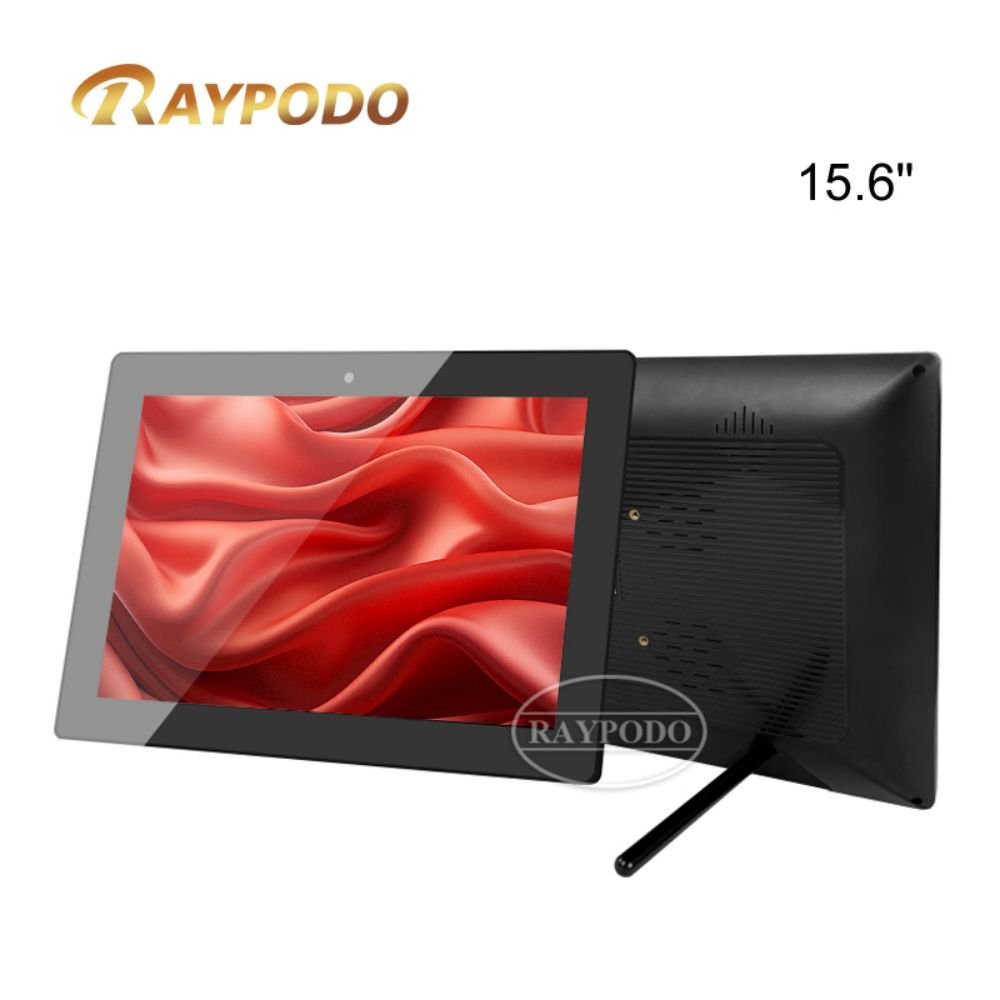
RAYPODO 15.6 inch product spec
Transforming Educational and Cultural Landscapes
The Raypodo 15.6-inch tablet represents a paradigm shift in how educational institutions and cultural organizations engage with their audiences. This advanced display solution brings together cutting-edge technology and pedagogical expertise to create immersive learning environments and interactive cultural experiences. The larger screen size provides ample space for collaborative interactions and detailed content presentation, making it ideal for environments where information absorption and engagement are paramount. Educational institutions from primary schools to universities are leveraging this technology to enhance traditional teaching methods, while museums and cultural centers are using these displays to bring exhibits to life and provide deeper contextual understanding for visitors.
Advanced Technical Capabilities for Demanding Environments
The tablet’s technical specifications are specifically engineered to meet the rigorous demands of educational and cultural applications. The available chipset configurations, particularly the high-performance RK3576 and RK3588 models, deliver the processing power needed for complex educational software, high-resolution video content, and sophisticated interactive applications. With 4GB RAM and substantial storage capacity (32GB-64GB depending on configuration), the device handles multiple applications simultaneously while maintaining smooth performance. The Android operating system compatibility, spanning versions 12 through 14, provides access to an extensive ecosystem of educational applications, museum guide software, and specialized content management systems designed for institutional use.
Interactive Learning Stations and Collaborative Environments
In educational settings, the tablet serves as a comprehensive learning station that supports both individual and group learning activities. The generous 15.6-inch display accommodates multiple users simultaneously, facilitating collaborative problem-solving and group discussions. Touchscreen capabilities enable hands-on interaction with educational content, from virtual science experiments to interactive historical timelines and mathematical visualizations. Educational institutions can deploy these tablets in libraries, common areas, and specialized learning centers to provide always-available resources for students. The devices support various learning styles through multimedia content, interactive exercises, and adaptive learning applications that adjust to individual student progress and needs.
Museum Exhibition Enhancement and Visitor Engagement
Museums and cultural institutions are leveraging the tablet’s capabilities to create deeply engaging visitor experiences that complement physical exhibits. The high-resolution screen displays detailed artifact images, virtual reconstructions, archival footage, and expert commentary that provide context and depth to collections. Interactive features allow visitors to explore content at their own pace, diving deeper into areas of particular interest. The tablets can be integrated into exhibition design as standalone information points or as part of larger multimedia installations. For temporary exhibitions, the flexibility of digital content allows for cost-effective updates and changes without physical modifications to the exhibition space.
Digital Wayfinding and Institutional Navigation
The tablet serves as an advanced wayfinding solution for large educational campuses and museum complexes. Interactive maps help visitors navigate complex facilities efficiently, while additional content provides context about different areas and points of interest. The system can be updated in real-time to reflect temporary exhibitions, special events, or facility changes. For educational institutions, wayfinding solutions can include class schedules, room availability, and event information. Museum applications can provide suggested routes based on visitor interests, time constraints, or special exhibition access, enhancing the overall visitor experience and reducing congestion in popular areas.
Multimedia Content Presentation and Information Delivery
With excellent video playback capabilities and substantial storage capacity, the tablet excels at presenting rich multimedia content that enhances understanding and engagement. Educational institutions use the devices for displaying student work, broadcasting announcements, showcasing educational videos, and presenting real-time data visualizations. Museums utilize the technology for presenting documentary content, artist interviews, conservation information, and contextual material that deepens appreciation of collections. The ability to present high-quality audio alongside visual content creates immersive experiences that cater to different learning preferences and accessibility needs.
Accessibility and Inclusive Design Features
The tablet incorporates comprehensive accessibility features that ensure educational and cultural content remains available to all visitors. Text-to-speech functionality, high-contrast display modes, adjustable text sizes, and closed captioning support users with visual or hearing impairments. The interface can be customized to accommodate different physical abilities, with adjustable touch sensitivity and alternative input methods. Multi-language support makes content accessible to international visitors and non-native speakers, while culturally sensitive design ensures information is presented in ways that respect diverse backgrounds and perspectives.
Remote Management and Centralized Content Control
Educational and cultural institutions benefit from sophisticated remote management capabilities that allow centralized control of multiple devices across campuses or museum sites. Administrators can update content, monitor device status, and troubleshoot issues without physical access to each unit. Content scheduling features allow for time-sensitive information display, such as class changes, special event information, or temporary exhibition details. Usage analytics provide insights into popular content, visitor engagement patterns, and device utilization, helping institutions optimize their digital strategy and resource allocation.
Durability and Security for Public Environments
Built for high-traffic institutional environments, the tablet features robust construction that withstands the demands of continuous public use. Enhanced security features protect against unauthorized access while maintaining ease of use for intended audiences. The devices are designed to resist damage from accidental impacts, spills, and environmental factors common in public spaces. Secure mounting options prevent theft or unauthorized movement, while centralized management capabilities allow rapid response to any security concerns or technical issues.
Curriculum Integration and Educational Value
For educational institutions, the tablet offers numerous opportunities for curriculum enhancement and innovative teaching methodologies. Teachers can create interactive lessons that incorporate multimedia resources, real-time data, and collaborative activities. The devices support flipped classroom models by providing access to instructional content outside traditional class time. Integration with learning management systems allows for seamless incorporation of tablet-based activities into broader educational frameworks. The technology also supports project-based learning approaches, where students use the tablets for research, content creation, and presentation of their work.
Cultural Preservation and Digital Archiving
Museums and cultural institutions use the tablet technology for digital preservation efforts, providing access to fragile or rare items that cannot be physically displayed. High-resolution imaging allows visitors to examine artifacts in detail that would be impossible with the naked eye. Digital archives can be made accessible through intuitive interfaces that allow exploration based on various criteria such as time period, geographical origin, or thematic connections. This approach both preserves delicate originals and makes cultural heritage more accessible to broader audiences.
Professional Development and Staff Training
The tablets serve as valuable tools for staff training and professional development in both educational and cultural settings. Interactive training modules can be deployed on the devices, allowing staff to learn at their own pace. For museums, the technology can provide curators and educators with quick access to collection information, research materials, and presentation resources. In educational institutions, the devices support teacher professional development through access to best practices, instructional videos, and collaborative planning tools.
Click here to learn more about Raypodo tablets


Leave a Reply
You must be logged in to post a comment.